Custom Validation
IG-XL offers convenient test instance validation via the CustomValidation attribute for test methods. During validation, every test instance using a test method decorated that way is called with its correct context. While no hardware can (and should!) be programmed in that phase, this mechanism can be used to:
- check input values for valid range (like voltages, currents)
- check pins / patterns / method delegates / setups are valid
- verify the requested combination of inputs is supported
- perform time consuming object initialization and input processing once only
[TestMethod, Steppable, CustomValidation]
public void Baseline(PinList pinList, double voltage, double currentRange, double waitTime, string setup = "") {

    if (TheExec.Flow.IsValidating) {
        // perform validation only tasks
    }

    ...
}
Object Initialization
Test parameterization is done in IG-XL by the flow controller handing the parameters into the test method at runtime. In IG-XL, that data is cached, and locally made available within the test method that way. While this is performance optimized for the case when data is used "as-is", some overhead may occur when it needs to be converted or processed before it can be used.
To avoid that, such processing can be done once only during validation and preserved for subsequent use. Because the input is static (= the same in every run), pre-processing results can be stored in class using test classes persistence:
[TestClass(Creation.TestInstance)]
public class Read : TestCodeBase {

    PatternInfo _patternInfo;
    Pins _pins;
    tlBitOrder _bitOrder;

    [TestMethod, Steppable, CustomValidation]
    public void Baseline(Pattern pattern, PinList readPins, int startIndex, int bitLength, int wordLength, bool msbFirst, bool testFunctional,
        bool testValues, string setup = "") {

        if (TheExec.Flow.IsValidating) {
            _pins = new Pins(readPins);
            _patternInfo = new(pattern, true);
            _bitOrder = msbFirst ? tlBitOrder.MsbFirst : tlBitOrder.LsbFirst;
        }

        ...
    }
}
Parameter & Context Checking
In many cases constraints exist for parameters, like min/max levels, pin counts, pattern existence ... and well-designed, reusable TestMethods should offer helpful messages when these are not properly met. IG-XL supports test instance argument validation error reporting, and that mechanism can be used for custom test methods:
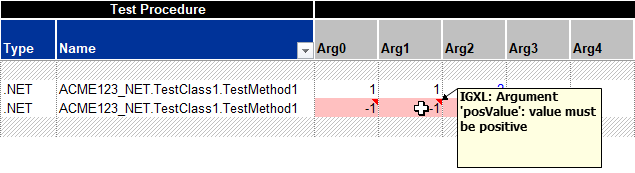
The following blocks are offered for validation at TheLib.Validate as a starting point. This list may not be complete, and over time, additional validation features may (will!) surface, and the design goal is that these can easily be added following the common use model and utilizing the infrastructure created here.
Validating a Single Parameter
These blocks offer validation of specific parameters, and support test instance parameter cell highlighting in case of a fail:
| Argument Specific Test Blocks | Functionality |
|---|---|
bool InRange<T>(T value, T from, T to, string argumentName) |
checks if a numeric value is between two bounds (including) |
bool GreaterOrEqual<T>(T value, T boundary, string argumentName) |
checks if a numeric value is greater or equal to a bound |
bool LessOrEqual<T>(T value, T boundary, string argumentName) |
checks if a numeric value is less or equal to a bound |
bool Pattern(Pattern pattern, string argumentName, out PatternInfo patternInfo) |
checks for valid pattern spec and creates the object (preferred over new PatternInfo()) |
bool Pins(PinList pinList, string argumentName, out Pins pins) |
checks for C#RA supported pin spec and creates the object (preferred over new Pins()) |
bool MethodHandle<T>(string fullyQualifiedName, string argumentName, out MethodHandle<T> delegate) where T : Delegate |
checks for valid method handle spec and creates the object (used to be GetDelegate, preferred over new MethodHandle<T>()) |
bool MultiCondition<T>(string csv, Func<string, T> parser, string argumentName, out T[] conditions, int? referenceCount = null) |
checks multi-condition validity and creates the data array (used to be SplitMultiCondition) |
bool Enum<T>(string value, string argumentName, out T enumValue) where T : Enum |
checks if a string value can be parsed to the specified enum type and creates the enum value |
bool Setup(string setup, string argumentName) |
checks if a setup with that name exists |
Important
In order to flag the correct test method argument, IG-XL needs to be informed which one caused the fail via the argumentName. This is achieved through reflection performing a method argument look-up. For a robust solution, that doesn't break in case of a rename, use the nameof() operator.
By requiring an argumentName in these methods, users are nudged to use them for checks that are tied to dedicated arguments. The methods however will quietly tolerate empty strings and still correctly fail validation - and highlight that fact in the validation error message shown.
Validating Combinations of Parameters or Other Scenarios
Validation checks that can't be connected to a single parameter only, like an illegal combination of parameters, which would be fine by themselves, or a certain system context to be available can also be validated. In that case a meaningful validation fail message needs to be provided to the user, clearly describing the problem, reason and resolution options:
| Argument Agnostic Test Blocks | Functionality |
|---|---|
bool IsTrue(bool condition, string problemReasonResolutionMessage, string argumentName) |
checks for condition == true (fallback for ANY checks) |
void Fail(string problemReasonResolutionMessage, string argumentName) |
raises an unconditional validation error |
All validation methods report potential issues directly to IG-XL, which collects them for a collided validation error report. To support dependent checks ("only if pins are valid, check if any of type XYZ are in there"), they return a boolean result for success.
Note
The language node TheLib.Validate was previously called TheLib.Validation - the rename aligns it with the test block action categorization described in the test block language hierarchy.
Applied to the test method above, the validation section could look like:
[TestClass(Creation.TestInstance)]
public class Read : TestCodeBase {

    PatternInfo _patternInfo;
    Pins _pins;
    tlBitOrder _bitOrder;

    [TestMethod, Steppable, CustomValidation]
    public void Baseline(Pattern pattern, PinList readPins, int startIndex, int bitLength, int wordLength, bool msbFirst, bool testFunctional,
        bool testValues, string setup = "") {

        if (TheExec.Flow.IsValidating) {
            TheLib.Validate.Pins(readPins, out _pins, nameof(readPins));
            TheLib.Validate.Pattern(pattern, out _patternInfo, nameof(pattern));
            TheLib.Validate.GreaterOrEqual(startIndex, 1, nameof(startIndex));
            TheLib.Validate.GreaterOrEqual(bitLength, 1, nameof(bitLength));
            TheLib.Validate.InRange(wordLength, 1, 32, nameof(wordLength));
            TheLib.Validate.Setup(setup, nameof(setup));
            _bitOrder = msbFirst ? tlBitOrder.MsbFirst : tlBitOrder.LsbFirst;
        }

        ...
    }
}